

Most Australian Amazon sellers open their settlement report once a fortnight, glance at the deposit amount, and close it again. The problem is that the deposit tells you almost nothing. Everything useful what you actually sold, what Amazon charged you, what you were reimbursed for, what got taken out for advertising is buried in the line items.
Reading the report properly matters. It’s the only place you can see your true gross sales, your real cost of selling on Amazon, and whether your books in Xero actually match what happened on the platform. Miss the detail and you’re pricing, budgeting, and lodging BAS based on numbers that don’t reflect reality.
This is a full walkthrough of the Amazon settlement report explained for Australian sellers what every line means, how to reconcile it to your bank deposit, and where sellers most often misread it.
Where to find the report
Log in to Amazon Seller Central and navigate to Reports → Payments → Statement View. Amazon generates a new settlement report every two weeks (or shorter for high-volume sellers on custom cycles). Each report covers a specific settlement period and lists every transaction that hit your account in that window.
You can also download it as a flat file or summary CSV, which is what tools like A2X use to automate reconciliation. For manual reconciliation, the statement view is easier to read.
The structure of the report
Every settlement report has three parts.
The header shows the settlement ID, start and end date, deposit date, deposit amount, and currency. The deposit amount is what actually landed in your bank account. Everything else in the report explains how Amazon arrived at that number.
The summary section groups transactions into categories: income, refunds, expenses, and adjustments. If you’re doing a quick reconciliation, this is enough. If you want to know exactly what happened, you need to look deeper.
The transaction detail lists every individual line item every sale, every fee, every refund, every reimbursement with dates, amounts, and (where relevant) the associated order ID. This is where the real story of what happened in the period lives.
What every line actually means
Amazon uses a lot of terminology that isn’t always intuitive. Here’s what the main categories mean.
Income lines
Product sales — the gross value of items sold during the period, before any fees are deducted. This is your revenue for accounting purposes, not the deposit amount.
Shipping credits — what customers paid for shipping, credited to your account. This is also revenue.
Gift wrap credits — customer-paid gift wrap charges. Same treatment as shipping — revenue.
Promotional rebates — discounts you offered (Lightning Deals, coupons, promotional codes). These reduce the gross sale value.
Sales tax collected — sales tax Amazon collected on your behalf. On Amazon AU, this is typically GST collected under the electronic distribution platform rules. Amazon remits this directly to the ATO, so it flows in and back out again but you still need to see it.
Selling fee lines
Referral fee — Amazon’s commission on each sale. Typically ranges from 6% to 15% depending on the product category.
Closing fees — an additional per-item fee that applies to certain categories like media (books, DVDs, video games).
Variable closing fees — legacy fee for certain media categories.
Subscription fee — your monthly Professional selling plan fee ($49.95 USD or the AU equivalent) if applicable.
FBA-specific fees
FBA fulfilment fee — the per-unit cost Amazon charges to pick, pack, and ship your product from an FBA warehouse. Varies by size and weight.
FBA storage fee — monthly cost for storing your inventory in Amazon’s warehouses. Charged based on cubic volume and seasonally adjusted (much higher during Q4).
Long-term storage fee — additional charge for inventory sitting in FBA warehouses for over 365 days. Only appears twice a year, but often as a large unexpected line item.
Inbound transportation fee — cost of sending inventory to FBA warehouses if you used Amazon’s Partnered Carrier program.
FBA removal fee — cost of pulling stock out of FBA (returning to you or disposing).
Advertising lines
Sponsored Products / Brands / Display charges — your Amazon PPC advertising spend. This is a marketing cost, not a platform fee. Code it separately.
Advertising rebates — refunds on advertising, usually related to invalid clicks or promotional credits.
Adjustment lines
Refunds — returns processed during the period. Reduces the original sale.
Refund administration fee — Amazon charges an admin fee on some refunds, which reduces the refund amount you have to bear.
Reimbursements — money Amazon pays you for lost or damaged FBA inventory, or for other issues Amazon has resolved in your favour. This is income.
Chargebacks — customer-initiated payment disputes. Usually results in a refund plus a small dispute fee.
Coupon redemption fee — Amazon charges a small fee when a customer redeems one of your coupons, on top of the discount itself.
Currency conversion
If you’re an Australian seller receiving USD from Amazon US, you’ll also see currency conversion lines. Amazon converts USD to AUD at its own rate (typically less favourable than the market rate) and applies a conversion fee. This gap is real and needs to sit in your books as an FX cost.
How to reconcile the report to your bank deposit
The formula that ties everything together looks like this:
Gross product sales
+ Shipping credits
+ Gift wrap credits
+ Reimbursements
- Refunds
- Referral fees
- FBA fulfilment fees
- FBA storage fees
- Long-term storage fees
- Advertising spend
- Subscription fees
- Chargebacks
- Other adjustments
= Net proceeds
- Reserve holds (if any)
= Bank deposit amount
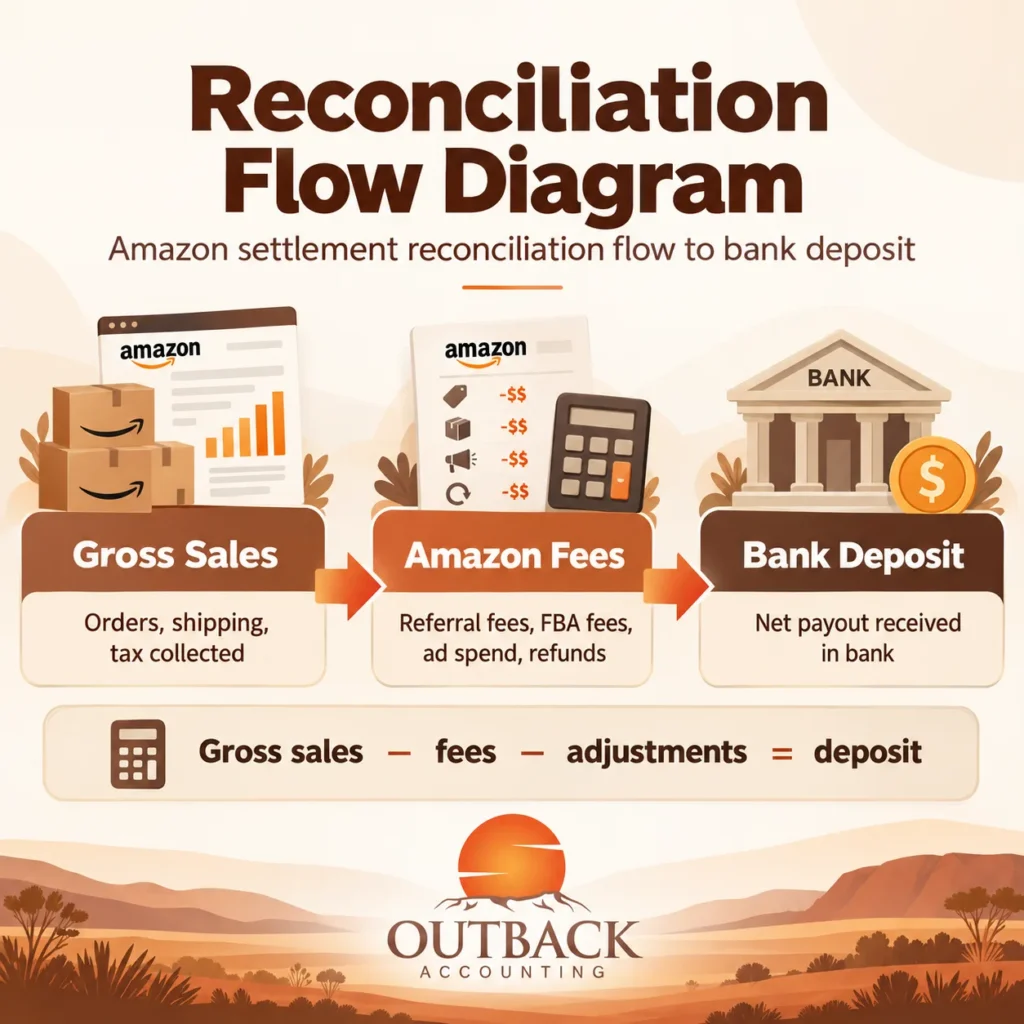
If the bank deposit matches this figure to the cent, your reconciliation is correct. If it doesn’t, the difference is almost always in one of three places: a fee category you missed, an adjustment you didn’t account for, or a reserve amount Amazon held back.
Understanding reserve holds
New Amazon accounts, high-risk categories, or accounts flagged for review often have Amazon hold a reserve a portion of what you’re owed, released on a delayed schedule.
Reserves show up as a subtraction from your deposit (“previous reserve amount released” as an add-back in a later period). If you’re not tracking the reserve balance in your books, deposits can look wrong when the answer is actually just timing.
For accounting purposes, the reserve is money you’ve earned but not yet received. It sits in an Amazon clearing account as a debit balance until released.
GST treatment for Australian Amazon sellers
For sales on Amazon AU to Australian consumers, Amazon operates as an electronic distribution platform under Australian tax law. Amazon collects and remits GST on your behalf in most cases, so the GST portion appears in the report but doesn’t flow through to your BAS as GST collected by you.
For sales on Amazon US of physical goods exported to US customers, sales are generally GST-free exports for Australian tax purposes. Still needs to be reported on your BAS, but as GST-free supplies rather than taxable sales.
The GST on Amazon’s own fees to Australian sellers is claimable as an input tax credit if you’re GST-registered. Sellers who don’t reconcile the fee detail miss this credit every quarter.
Common misreadings to watch for
Treating the bank deposit as revenue. The most expensive mistake. Revenue is gross product sales; the deposit is net after every fee and adjustment.
Missing long-term storage fees. These only appear twice a year and often catch sellers by surprise as a large deduction they didn’t budget for.
Coding advertising as a platform fee. Sponsored Products is advertising spend. Keep it separate from Amazon’s platform fees so you can evaluate ad performance properly.
Ignoring reimbursements. Money Amazon pays you back for lost or damaged inventory is real income. Missing it distorts both your P&L and your inventory balance.
Forgetting FX on USD settlements. For Australian sellers on Amazon US, the AUD amount you receive is a conversion — not the original sale value. FX gains and losses need to be tracked separately.
How A2X automates all of this
Doing this manually every fortnight is slow, boring, and error-prone. A2X connects to your Amazon seller account, pulls each settlement report automatically, categorises every line item into the right accounting bucket, and posts a summarised journal entry to Xero.
Bank reconciliation matches to the cent. GST treatment is applied automatically. FX movements are captured. Long-term storage fees, reimbursements, and other adjustments land in the right accounts without manual coding.
For any Australian Amazon seller doing meaningful volume, an A2X integration typically pays for itself in the accountant time saved in the first month, and produces books that reflect what actually happened rather than a rough approximation.
When to bring in specialist help
For a single-product low-volume Amazon store, self-managing the settlement report is workable. As soon as complexity increases, having a specialist ecommerce accountant involved saves time and prevents mistakes that compound.
Bring in help when:
- You’re doing meaningful volume across multiple SKUs
- You sell on Amazon US or UK alongside Amazon AU
- You use multiple gateways or multiple currencies
- Your reconciliation isn’t tying and you can’t figure out why
- You want an A2X integration set up properly from the start
Our team of Amazon ecommerce accountants works with Australian Amazon sellers on A2X and Xero setup, monthly reconciliation, GST compliance, and BAS lodgement. Everything built around how Amazon actually reports and settles.
Frequently asked questions
How often does Amazon send settlement reports? Standard settlement periods are 14 days. High-volume sellers or those on custom payment cycles may receive them weekly or on specific dates. Each report covers a defined period and settles into a single bank deposit.
Is the deposit amount my revenue? No. The deposit is what’s left after Amazon deducts referral fees, FBA fees, advertising, refunds, and any adjustments. Your revenue is the gross product sales figure at the top of the report.
What are FBA storage fees and long-term storage fees? Standard FBA storage fees are charged monthly based on the cubic volume your inventory takes up in Amazon warehouses. Long-term storage fees apply to inventory sitting in warehouses for over 365 days and only appear twice a year — usually as a large lump-sum charge that catches sellers off guard.
How does A2X read the Amazon settlement report? A2X pulls the raw settlement data directly from Amazon Seller Central, categorises every line item (sales, refunds, fees, adjustments), applies your chart of accounts mapping and GST rates, then posts a summarised journal to Xero. The result reconciles to the deposit amount without manual intervention.
What GST applies to Amazon Australia sales? For Australian consumer sales, Amazon collects and remits GST under the electronic distribution platform rules. As an Australian seller, you don’t charge GST separately — but Amazon does charge GST on its own fees to you, which is claimable as an input tax credit on your BAS.
Why is my Amazon reserve holding funds back? Amazon holds reserves on new accounts, accounts in higher-risk categories, or accounts flagged for review. The reserve is money you’ve earned but not yet received. It gets released on a delayed schedule and appears as an add-back in a later settlement.
Can I read the settlement report in AUD? For Amazon AU, yes reports are in AUD. For Amazon US or UK, reports are in USD or GBP and get converted when funds transfer to your Australian bank account. The conversion rate and any fee are shown separately in the report.
Get your Amazon reconciliation set up properly
If you’re spending hours per fortnight trying to make sense of your settlement report, or your books don’t match your bank deposits, the setup is worth fixing once rather than continuing to patch it every cycle.
Our Amazon ecommerce accountants work with Australian Amazon sellers on A2X integration, Xero setup, GST treatment, and ongoing reconciliation. Get in touch with our Sydney team to talk about setting yours up properly.
Disclaimer: This article is for general information purposes only and does not constitute financial, tax, or legal advice. For advice specific to your circumstances, please reach out to your accountant.