


Plenty of Australian ecommerce businesses connect WooCommerce to Xero, tick a box that says “integration complete,” and assume the accounting side is now sorted. Then a few months in, revenue in Xero doesn’t match sales in WooCommerce, GST on the BAS looks off, and nobody can quite explain why the Stripe balance is sitting where it is.
Connecting the two systems is not the same as setting up the accounting correctly. A single WooCommerce order can involve product revenue, GST, discounts, shipping income, a refund a week later, a payment gateway fee, foreign currency, an inventory movement, and settlement timing that puts the money in your bank several days after the order was placed. If your accounting workflow doesn’t handle all of that properly, the numbers will drift.
This is a guide to WooCommerce accounting Australia what actually happens inside a properly structured setup, where things typically go wrong, and how to reconcile the pieces so your books tell you the truth.
Why WooCommerce accounting gets complicated
There are four separate systems involved in every WooCommerce sale, and they don’t automatically agree with each other.
The customer places an order in WooCommerce. Their card is charged through Stripe or PayPal or another payment gateway. The gateway deducts its fees and any refund adjustments, then deposits the net amount into your bank account, often on a delay of one to three business days. Meanwhile, Xero is meant to record all of it in a way that produces accurate revenue, GST, expenses, and bank balances.
The problem is that each of those four systems (WooCommerce, the gateway, the bank, and Xero) records the transaction differently.
For example, a customer pays $110 including GST for a product. Stripe deducts a fee of around $3.50 and deposits $106.50 into your business bank account two days later. If your accounting simply records $106.50 as sales when the deposit lands, three things are wrong immediately. Your revenue is understated by $3.50. Your merchant fee expense of $3.50 is missing. And your GST reported to the ATO is $10 lower than it should be because you’re calculating GST on the net figure rather than the gross sale.
That single missed workflow, repeated across every order, is how ecommerce businesses end up with revenue in Xero that has no relationship to the sales showing in WooCommerce.
The correct accounting flow
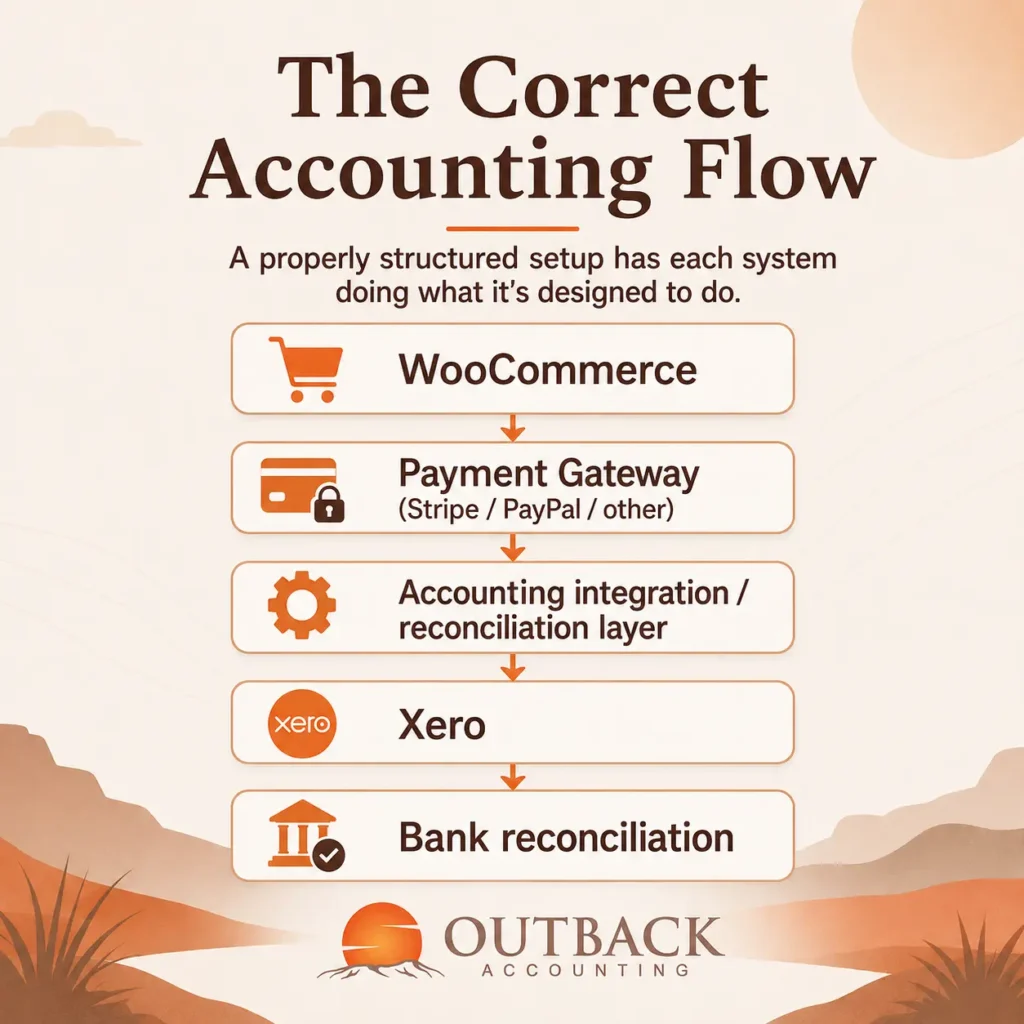
WooCommerce is the source of truth for order detail the customer, the products, the quantities, discounts, shipping, and refund history. It’s where you look to answer “what did we actually sell?”
The payment gateway processes the money. It records gross sale amounts, fees deducted, refunds issued, chargebacks, dispute fees, and the net settlement figure that eventually reaches the bank.
The integration or reconciliation layer between them is what translates order activity into accounting entries. This might be a direct WooCommerce-to-Xero connector, a middleware tool that summarises payouts, or a manual reconciliation process the right choice depends on volume and complexity.
Xero then holds the accounting records: revenue by category, GST, merchant fees, refunds, COGS, and the bank balance.
Bank reconciliation is where you prove everything ties together that the gross sales, minus the fees, minus refunds, equals the actual amount that landed in the bank.
The important part is that each system stays in its lane. Trying to make Xero the source of order detail, or trying to reconcile directly from the bank without accounting for gateway movements, is where most accuracy problems start.
Setting up WooCommerce with Xero
There are a few different ways to move data between WooCommerce and Xero, and no single method is right for every business.
Direct integrations push each WooCommerce order into Xero as a separate invoice. This works well for lower-volume stores where you want visibility over every transaction. The downside is that at higher volumes, Xero fills up with hundreds or thousands of individual invoices, which slows things down and makes reconciliation harder rather than easier.
Middleware or connectors sit between WooCommerce and Xero and do more of the reconciliation work. Tools like A2X and Link My Books can summarise WooCommerce activity into settlement-based journal entries that match your gateway payouts. This tends to work better for higher-volume stores because it keeps Xero clean and produces bank deposits that reconcile properly.
Summary accounting integrations post one journal per day or per payout, aggregating sales, GST, discounts, refunds, and fees into a single clean entry. Same idea as middleware, but with less granularity.
Manual or custom workflows are still common in smaller businesses or those with unusual requirements. They work, but they take time and are more prone to error.
The appropriate setup depends on your sales volume, how many payment methods you accept, whether you carry inventory, and what kind of reporting you need. A store processing 20 orders a month doesn’t need the same setup as one processing 2,000.
How to account for WooCommerce sales
Once orders are flowing through to Xero, sales need to be split into meaningful categories rather than being lumped into a single “Sales” account.
At minimum, most WooCommerce businesses want to separate:
- Product sales
- Shipping income
- Discounts (as a reduction of revenue)
- Refunds (against the original sale category)
- GST collected
- GST-free sales, where relevant
- International sales, where relevant
The reason to separate these is that they behave differently. Shipping income is revenue but is often marked up above cost. Discounts affect your gross margin but should still be visible so you can see how much you’re giving away. Refunds need to reduce the original sale rather than sit as a standalone expense.
Australian GST treatment depends on the facts of each transaction. Sales to Australian customers are generally taxable. Physical goods exported to overseas customers are usually GST-free. But there are edge cases digital products, drop-shipped goods from overseas, sales to overseas customers of goods held in Australia that need to be treated based on their specific circumstances. If you’re unsure how a particular sale type should be handled, that’s a conversation to have with your accountant or registered BAS agent rather than a default assumption.
WooCommerce GST for Australian businesses
The practical GST considerations for a WooCommerce store come down to a few things.
Your WooCommerce store needs to be set up to display and charge prices in the right way. Most Australian ecommerce businesses display GST-inclusive pricing, but the settings behind the store need to correctly identify how much of each price is GST and how much is the underlying product value. If the store is configured for GST-exclusive pricing but displays GST-inclusive prices to customers, the tax reporting behind it can go sideways quickly.
Sales to Australian customers should generally include GST at 10%. Shipping charges to Australian customers are also typically GST-inclusive. Discounts reduce the taxable value. Refunds reverse both the sale and the GST originally collected.
Sales of physical goods shipped to overseas customers are usually GST-free exports, but they still need to be reported on your BAS as GST-free supplies rather than left out entirely.
The most common failure point is a mismatch between WooCommerce and Xero. WooCommerce might be calculating GST on the sale, and then Xero applies GST again during the integration meaning GST is duplicated. Or WooCommerce is set to include GST but the integration to Xero treats the sale as GST-free, meaning GST is missed entirely. In practice, this is where a lot of BAS lodgements need to be amended after the fact.
Getting the tax code mapping right between WooCommerce and Xero during setup avoids months of clean-up later.
Reconciling Stripe, PayPal and other payment gateways
Payment gateways should be treated as clearing accounts in Xero not as bank accounts, and not as sales.
The reconciliation flow looks like this:
- WooCommerce records the customer order (say, $110 including GST)
- Stripe collects the customer’s payment of $110
- Stripe deducts its processing fee (say, $3.50) and holds the funds briefly
- Stripe deposits the net amount ($106.50) into your bank account
- Your accounting records post the $110 sale, the $3.50 fee, and the $106.50 bank deposit all reconciling back to the original order
The Stripe clearing account in Xero should tick up with the gross sale, tick down with the fee, and tick down again with the payout to the bank. At any point in time, the balance should equal the funds Stripe is holding that haven’t yet been paid out.
Merchant processing fees should be recorded as a separate expense line, not netted against sales. This matters because you need to see what those fees are actually costing you month to month. For businesses processing meaningful volume, merchant fees are a real expense category worth tracking.
The same applies to PayPal, Square, After pay, or any other gateway. Each one is its own clearing account, and each one needs its own reconciliation.
Handling WooCommerce refunds and chargebacks
Refunds and chargebacks are where a lot of WooCommerce accounting quietly goes wrong.
A full refund reverses the original sale, the GST collected, and the payment. If the refund happens in the same reporting period as the sale, it’s relatively clean. If it happens across periods say, a December sale refunded in February the entries need to be timed correctly to avoid revenue and GST being overstated in December and under corrected in February.
Partial refunds are trickier because the original sale amount changes. If a customer returns one item from a three-item order, only the product revenue for that item, its share of shipping, and the corresponding GST should be reversed.
Chargebacks are refunds initiated by the customer’s bank rather than by you. They’re often accompanied by a dispute fee from the payment gateway ($15–$25 is typical for Stripe), which is a separate expense that needs to be recorded.
Settlement timing differences also matter. A refund issued through Stripe may not appear as a deduction on your bank deposits until the next payout cycle. Reconciling the gateway clearing account is what catches these gaps before they become a problem at BAS time.
Incorrect refund treatment doesn’t just distort revenue. It also affects the GST you report to the ATO, and it can create phantom revenue in months where the original sale was recorded but the refund was missed.
Inventory and cost of goods sold
WooCommerce can track stock quantities, but it’s not designed to be a full inventory accounting system. For businesses that need to report gross margin accurately, inventory usually needs to be managed either in Xero or in a dedicated inventory tool that integrates with both.
Proper inventory accounting requires tracking opening inventory, purchases during the period, closing inventory on hand, and cost of goods sold (COGS) as items are sold. If you’re not tracking these, your P&L won’t show a real gross margin because the cost of what you sold this month is missing from your books.
Beyond the basics, there are a few situations that add complexity. Damaged or written-off stock needs to be removed from inventory as a loss rather than staying on the balance sheet. Bundles or kits, where multiple products are combined into a single SKU, need their component costs allocated correctly. Multiple warehouses or fulfilment locations require inventory to be tracked by location rather than as a single pool.
None of this is impossible, but it needs to be set up deliberately. Trying to reconstruct inventory and COGS accurately at year end, without proper tracking during the year, is one of the more painful accounting exercises an ecommerce business owner can go through.
Common WooCommerce accounting mistakes
Recording net Stripe deposits as revenue is the most frequent one. It understates both revenue and merchant fees, and undercounts GST.
Importing duplicate sales into Xero happens when both a direct WooCommerce integration and a gateway integration are running at the same time. Each one posts the sale, and Xero ends up with double the revenue.
Incorrect GST codes come from mismatched settings between WooCommerce and Xero, and often go unnoticed until a BAS reconciliation flags a discrepancy.
Not reconciling WooCommerce refunds leaves original sales on the books that no longer exist, along with the GST that was already refunded to the customer.
Ignoring payment gateway clearing balances means unsettled amounts sit in the wrong place, and there’s no easy way to prove that gateway activity ties back to the bank.
Recording merchant fees incorrectly usually by netting them against sales instead of showing them as a separate expense — hides one of the larger recurring costs in an ecommerce business.
Mixing personal and business bank transactions makes the entire reconciliation harder and creates GST complications that are avoidable with a dedicated business account.
Failing to reconcile inventory and COGS produces a gross margin figure that doesn’t reflect what the business is actually earning per sale.
Treating WooCommerce reports as the final accounting records is a mistake because those reports don’t reflect refunds processed manually, gateway fees, or adjustments made in Xero.
Not checking month-end gateway balances is how discrepancies build up quietly across quarters and only surface at year end.
Poor treatment of international sales or foreign currencies creates FX gaps and often results in GST-free exports being reported as taxable sales, or vice versa.
Each of these has the same underlying cause: the accounting workflow doesn’t reconcile the movement from a customer order through to the bank deposit.
A practical month-end WooCommerce reconciliation checklist
At month end, a properly set-up WooCommerce accounting workflow should let you tick off the following:
- WooCommerce gross sales agree to the sales figure imported into Xero
- Discounts recorded in WooCommerce agree to Xero
- Refunds recorded in WooCommerce agree to Xero
- Shipping revenue agrees between the two systems
- GST is correctly allocated by transaction type
- Stripe, PayPal, and any other gateway settlements reconcile to the bank
- Gateway clearing account balances make sense (i.e. they equal known unpaid balances at month end)
- Merchant fees are recorded as a separate expense
- Bank deposits reconcile to expected settlement amounts
- Inventory and COGS entries are updated
- Foreign currency differences have been reviewed
- Any unmatched or unclear transactions have been investigated
If any of those don’t reconcile, the answer is almost always in one of the clearing accounts or in a refund that was processed in the gateway but not brought through to Xero. Finding and fixing those small gaps monthly is much easier than dealing with a year’s worth of them at BAS time or tax return time.
When a WooCommerce business needs an ecommerce accountant
Not every WooCommerce store needs specialist accounting support from day one. But there are situations where the workflow gets complex enough that a generalist accountant is likely to miss things.
Signs it’s time to bring in an ecommerce accountant include:
- High transaction volume (hundreds or thousands of orders per month)
- Multiple payment gateways running in parallel
- WooCommerce operating alongside Shopify, Amazon, or eBay
- Inventory that includes bundles, multiple warehouses, or high SKU counts
- International sales in multiple currencies
- Frequent refunds or high dispute volume
- BAS reconciliation issues that keep coming back
- A widening gap between store sales and Xero revenue
- Rapid growth outpacing the current bookkeeping setup
Outback Accounting offers ecommerce accounting services for WooCommerce that focus on getting the workflow right Xero setup, gateway reconciliation, GST treatment, and month-end procedures that keep the books current and accurate. If the setup is right from the start, most of the ongoing bookkeeping is straightforward. If it’s not, most of the ongoing bookkeeping is a clean-up job.
Conclusion
Good WooCommerce accounting isn’t about connecting your store to Xero and hoping the two systems agree. It’s about making sure the sales in your store, the money processed by your payment gateway, the fees you’re paying, the refunds you’re issuing, and the deposits landing in your bank all reconcile into one clean accounting workflow.
WooCommerce accounting Australia is a specific discipline. It sits at the intersection of ecommerce operations, payment processing, and Australian tax compliance. When it’s set up well, it gives you accurate revenue, accurate GST, and a real gross margin figure. When it’s not, it gives you numbers that look plausible but don’t reflect what actually happened.
If you’re not sure whether your current WooCommerce setup is reconciling properly, or you’re at the stage of setting it up for the first time, it’s worth having someone review the workflow before month-end reconciliations start piling up. A short review of your current setup can identify most of the common issues in an hour or two.
Frequently asked questions
Can WooCommerce integrate with Xero? Yes. WooCommerce can integrate with Xero using direct connectors, middleware tools like A2X or Link My Books, or custom workflows. The right choice depends on your sales volume, payment methods, and reporting requirements. Direct integrations work well for lower-volume stores where you want each order recorded individually. Middleware tools tend to suit higher-volume stores because they summarise activity into cleaner settlement-based journals that reconcile more easily with gateway payouts.
How should WooCommerce sales be recorded in Xero? Sales should be recorded at gross value the full amount the customer paid, before payment gateway fees are deducted. From there, merchant fees are recorded as a separate expense, refunds reduce the original sale category, and GST is applied based on the transaction type. Splitting revenue into product sales, shipping income, and discounts (rather than one lumped Sales account) gives you meaningful gross margin data and makes reconciliation with WooCommerce reports much easier.
Should Stripe deposits be recorded as sales? No. The amount Stripe deposits into your bank account is the net figure after fees are deducted. If you record it as sales, your revenue is understated, your merchant fees are missing, and your GST calculation is wrong. Stripe should be set up as a clearing account in Xero. Gross sales, fees, and refunds all flow through the clearing account, and the bank deposit is the final reconciliation step that closes each payout cycle.
How do I reconcile WooCommerce with Stripe? Reconciliation is a three-way match. Your WooCommerce gross sales should equal the total transactions processed through Stripe. Stripe fees deducted should be recorded as an expense in Xero. And the net payout from Stripe should reconcile to your actual bank deposit. If any of those three legs don’t tie, the difference is usually a refund, a dispute, or a timing gap between when the sale happened and when Stripe paid it out.
Does WooCommerce calculate Australian GST? WooCommerce can calculate GST if the tax settings are configured for Australian rules GST at 10%, applied to Australian customer sales, and correctly handled on shipping and discounts. However, the calculation is only as good as the setup. If WooCommerce is set to GST-exclusive but your prices display GST-inclusive, or if tax classes aren’t assigned correctly at the product level, the resulting GST reporting can be inaccurate. It’s worth having the tax setup reviewed by someone familiar with both WooCommerce and Australian GST rules.
Do I need an accountant for my WooCommerce store? Not necessarily at low volumes, but it becomes valuable as the business grows. Once you’re processing hundreds of orders a month, running multiple payment gateways, carrying real inventory, or selling internationally, the accounting workflow has enough moving parts that a generalist accountant may miss things. An ecommerce accountant familiar with WooCommerce will focus on getting the setup right and keeping the reconciliations current, which prevents most of the common problems from developing.
What is the best accounting software for WooCommerce in Australia? Xero is the most common choice for Australian WooCommerce businesses. It handles Australian GST natively, integrates well with the middleware tools most commonly used for ecommerce reconciliation, and produces the reports needed for BAS and income tax lodgements. MYOB and QuickBooks are also used, but the ecommerce integration ecosystem around Xero is generally stronger. The right software depends on the size and complexity of the business, but Xero is usually the default starting point.